The Salesforce-Anthropic partnership, formalised in late 2025, has moved Claude from an external AI assistant into the operational core of CRM workflows. This guide covers the technical architecture of that integration — how the Model Context Protocol works, how to configure it correctly, and where it delivers measurable business outcomes.
Who this is for: Salesforce administrators, solution architects, and technical decision-makers evaluating or actively implementing AI-augmented CRM workflows. Some steps reference Salesforce Setup UI and OAuth configuration — familiarity with those concepts is assumed.
Why Claude Inside Salesforce — and Why Now
For the past decade, AI additions to CRM platforms mostly meant rule-based scoring models, canned response suggestions, and dashboards that described the past rather than informing the present. The underlying limitation was always the same: the AI system sat outside the CRM and had no real-time access to live record data.
The Model Context Protocol changes that architecture fundamentally. MCP is an open protocol that lets external AI systems establish a live, authenticated connection to data sources — reading records, executing writes, and triggering workflows in real time. Salesforce has built first-party MCP server infrastructure directly into the platform, meaning Claude does not need a custom middleware layer or batch-sync jobs to access your org. It connects natively, within the Einstein Trust Layer security boundary.
The Salesforce-Anthropic partnership formalised this in October 2025 and expanded again in February 2026, making Claude one of the primary AI models available for Agentforce deployments. Claude brings strong document reasoning and complex instruction-following; Agentforce provides orchestration, action triggers, and guardrail enforcement inside Salesforce’s native infrastructure.
MCP Architecture: How the Connection Works

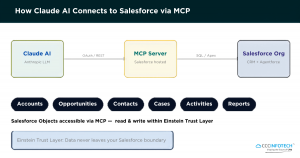
Claude communicates with Salesforce via hosted MCP servers using OAuth 2.0. All data access occurs within the Einstein Trust Layer.
The MCP integration has three functional layers:
Salesforce hosts a set of pre-built MCP servers inside your org. Each server exposes a category of Salesforce data over a standardised REST-like interface. The most broadly useful is the SObject All Data server, which covers core objects: Accounts, Contacts, Opportunities, Leads, Cases, Tasks, and Events. Salesforce also provides specialised servers for Metadata, Flow definitions, and Analytics.
These servers support both read (SOQL queries) and write (DML operations) within the permission boundaries of the authenticated user. They do not proxy data outside Salesforce’s infrastructure — everything routes through Einstein Trust Layer endpoints.
- Layer 2 — OAuth 2.0 Authentication
Claude authenticates to your Salesforce org using a standard OAuth 2.0 Connected App. The scope configuration determines exactly what Claude can read and write. For most implementations, the minimum required scopes are api (data access) and refresh_token / offline_access (persistent sessions).
- Layer 3 — Agentforce Orchestration (Optional)
For autonomous workflow execution — where Claude takes multi-step actions without human approval per step — Agentforce provides the orchestration layer. It manages agent state, defines which actions are permitted, enforces escalation rules, and logs every action for audit purposes. Claude operates as the reasoning model; Agentforce provides the execution envelope.
Important — Sandbox First: Salesforce generates separate MCP server URLs for sandbox and production orgs. Always complete your initial configuration in a full sandbox. Production MCP servers should only go live after end-to-end validation of OAuth flows, permission sets, and data write operations.
Step-by-Step MCP Configuration

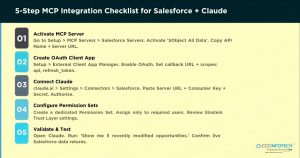
The five-step integration checklist — from activating the MCP server through live validation.
- Step 1 Activate the MCP Server — Navigate to Setup → Quick Find → MCP Servers → Salesforce Servers. Select SObject All Data, click Activate, and wait for Active status (1-2 min). Copy the API Name (strip the ‘platform.’ prefix) and Server URL.
- Step 2 Create an External Client App for OAuth — In Setup, search External Client App Manager and create a new app. Set Callback URL to http://localhost:38000/callback. Add scopes: ‘Manage user data via APIs (api)’ and ‘Perform requests at any time (refresh_token, offline_access)’. Copy Consumer Key and Consumer Secret.
- Step 3 Register the Connector in Claude — Open claude.ai → Settings → Connectors → Browse Connectors. Search Salesforce, enter the Server URL, Consumer Key, and Consumer Secret. Authorise the OAuth flow when prompted.
- Step 4 Create and Assign a Dedicated Permission Set — Never grant MCP access via profiles. Create a Permission Set scoped specifically to MCP — include only required object permissions. Assign only to users who need AI-assisted access. Review Einstein Trust Layer settings for regulated industries.
- Step 5 Validate the Live Connection — Open a Claude conversation and run: ‘Show me the five most recently modified Opportunities in my Salesforce org.’ A working connection returns live CRM data. If error, check callback URL, OAuth scopes, or MCP server activation status.
Troubleshooting Common Setup Failures
Most likely cause: Callback URL mismatch
Fix: Verify http://localhost:38000/callback exactly as entered — no trailing slash and no HTTPS.
Most likely cause: Permission Set missing object access
Fix: Check field-level security and ensure the required Salesforce objects are accessible for the queried user.
Most likely cause: Large result set or inactive server
Fix: Narrow the query using a date filter or LIMIT clause, and confirm the MCP server is active.
- Sandbox Works but Production Fails
Most likely cause: Different Server URLs for each environment
Fix: Re-register the connector using the production-specific MCP server URL instead of the sandbox URL.
Agentforce + Claude: Designing Autonomous Service Agents

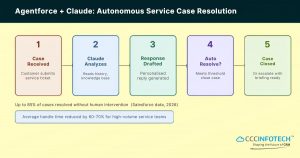
Fig 3. Agentforce agent workflow using Claude as the reasoning model. Up to 85% of standard service cases resolve without human involvement.
Agentforce agents are not rule-based bots. They receive a task description and a set of permitted actions, then decide the execution sequence dynamically — using Claude as the reasoning model for each decision step. The architecture is closer to a constrained autonomous agent than a traditional chatbot or workflow automation.
Key Design Considerations for Agentforce Deployments
Define actions at the minimum necessary permission level. If an agent’s purpose is to resolve service cases, it should have case-read, knowledge-base-read, email-send, and case-close permissions — nothing broader. Actions are defined in Agentforce as explicit capabilities; Claude cannot exceed what the action set permits.
Every production Agentforce agent must have escalation rules. Common thresholds include:
- Sentiment score below a defined value
- Contract value above a financial ceiling
- Regulatory flags — PII present, HIPAA-relevant terms
- Three or more failed resolution attempts
Claude within Agentforce operates on grounded context — it reads from Salesforce records and knowledge base articles, not from general web knowledge. This significantly reduces confabulation risk. For high-stakes outputs (financial calculations, legal commitments), always implement a human review gate before the agent sends or logs the output.
Observed Performance Benchmark: Salesforce data from early 2026 shows businesses using Agentforce resolving up to 85% of service queries without human involvement, with average handle time reductions of 60-70% for high-volume contact centres. These figures vary by case type diversity and knowledge base quality.
High-Value Use Cases Across CRM Functions
- Use Case 01 — Automated Activity Logging and CRM Hygiene
Claude reads call transcripts, meeting recordings, and email threads connected to Salesforce records, extracts structured data (stage changes, action items, stakeholder mentions), and logs them directly to the correct Account and Opportunity. Eliminates 30-45 minutes of daily admin per sales rep while improving pipeline data accuracy.
- Use Case 02 — Pattern-Based Lead Scoring Against Closed-Won Data
Rather than maintaining static scoring rules, Claude analyses patterns across historical closed-won deals — engagement cadence, deal progression velocity, stakeholder response characteristics — and applies that model to current leads. Scoring updates dynamically as new deal data accrues, without manual rule maintenance.
- Use Case 03 — Real-Time Deal Risk Detection
Claude monitors open opportunities for early signals of deal risk: communication cadence drop-off, sentiment shift in email exchanges, buying committee silence beyond a threshold period. Risk alerts surface directly in Salesforce or Slack. Previously required a dedicated sales ops analyst to perform manually each week.
- Use Case 04 — Marketing Cloud Campaign Intelligence
Connected to Salesforce Marketing Cloud, Claude analyses journey performance at the segment level — identifying underperforming branches, audience overlap issues, and send-time optimisation opportunities. Outputs specific recommendations tied to your actual subscriber data, not generic best-practice templates.
- Use Case 05 — Autonomous Service Case Resolution (Agentforce)
Full autonomous resolution loop for standard service cases: Claude reads the case, retrieves customer history and relevant knowledge articles, drafts a personalised resolution, then resolves or escalates with a structured briefing. Operates 24/7 at enterprise scale without proportional headcount growth.
- Use Case 06 — AI-Assisted QBR and Executive Reporting
Claude generates quarterly business review summaries, account health narratives, and pipeline coverage analysis directly from Salesforce data — surfacing risks, wins, and gaps in a structured format. Reduces reporting preparation time from hours to minutes for sales managers and account executives.
Industry-Specific Deployment Patterns
Primary use cases: Client briefing generation, portfolio communication monitoring, and compliance documentation.
Key compliance consideration: Implement zero-data-retention settings and maintain FINRA/SEC communication logging requirements.
- Healthcare & Life Sciences
Primary use cases: CRM workflow automation, case routing, and HCP engagement tracking.
Key compliance consideration: Enforce HIPAA boundaries through the Einstein Trust Layer and avoid exposing PHI within model context.
Primary use cases: Churn prediction signals, customer success workflow automation, and deal intelligence.
Key compliance consideration: Ensure proper data residency controls for international organizations.
Primary use cases: Engagement health monitoring, upsell opportunity detection, and client reporting.
Key compliance consideration: Protect client confidentiality and carefully review cross-account data sharing permissions.
Primary use cases: Customer journey automation, support deflection, and campaign analytics.
Key compliance consideration: Maintain strong consent management practices and clearly defined data retention policies.
Seven Implementation Mistakes to Avoid
✗ Treating this like a chatbot project — Claude within Salesforce executes actions against live data. The design framework is closer to an automation system than a conversational tool. Scope and permission design matter from day one.
✗ Integrating before cleaning CRM data — AI output quality is directly bounded by data quality. Incomplete or inconsistent Salesforce records produce unreliable scoring, inaccurate deal summaries, and misleading risk signals. A data audit is a prerequisite, not an afterthought.
✗ Starting without a defined use case — Implementations that begin with ‘let’s see what AI can do’ rarely sustain momentum. Identify one high-frequency, high-value workflow — activity logging or lead scoring are both well-validated starting points — prove the ROI, then expand.
✗ Granting overly broad MCP permissions — OAuth scopes and Permission Sets define what Claude can touch in your org. Over-permissioning creates audit risk and potential data exposure. Always grant minimum required access and review it post-launch.
✗ Skipping the sandbox validation phase — MCP write operations against production Salesforce data before end-to-end sandbox testing have caused data integrity issues. The sandbox-first rule is non-negotiable for any implementation involving write access.
✗ Not defining Agentforce escalation logic — Agents without clear escalation thresholds will either over-escalate (negating the efficiency gain) or under-escalate (creating service quality and compliance risk). Define conditions explicitly before any agent goes live.
✗ Attempting a DIY integration without Salesforce expertise — MCP configuration, Governor Limit management, OAuth debugging, and Agentforce agent design each have platform-specific pitfalls. A Salesforce Summit Partner shortens the path to stable production significantly.
Evaluating Integration Cost and ROI
- Native Agentforce (Existing Enterprise License)
Agentforce is available in Enterprise and Unlimited editions — some agent capacity is included, with additional conversations charged per-interaction. Claude as a model within Agentforce carries Anthropic’s per-token pricing. For most mid-market companies with moderate service volumes, total incremental cost is well below the cost of a single additional FTE.
- Claude Pro/Team + MCP Connector
For sales teams using the MCP connector with Claude’s web or desktop interface, a Claude Pro or Team subscription is the primary cost. Implementation effort — configuring MCP servers, OAuth, and Permission Sets correctly — is where a certified Summit Partner adds clear value, typically compressing a multi-week DIY process to 3-5 business days.
- Custom Claude API Integration
For organisations with workflows that go beyond native Agentforce capabilities — custom data pipelines, non-standard CRM objects, multi-system orchestration — direct Claude API integration offers greater flexibility and often better per-token economics at scale, with proportionally higher architecture and maintenance complexity.
ROI Timeline: Well-scoped implementations with clean CRM data typically reach measurable ROI within 60-90 days, driven primarily by sales rep time recapture (activity logging) and service cost reduction (Agentforce). Implementations with data quality issues or unclear use cases take 3-6 months to demonstrate comparable returns.
How CloudCentric Infotech Can Help
As a Salesforce Summit Partner — the highest tier in the Salesforce partner ecosystem — CloudCentric Infotech brings verified expertise, a deep implementation track record, and certified professionals across every major Salesforce cloud. We have implemented AI-powered Salesforce solutions for clients across retail, healthcare, life sciences, real estate, hospitality, manufacturing, education, and non-profit organisations.
What We Bring to a Salesforce + Claude AI Engagement
- Discovery and use-case prioritisation — We identify the 2-3 workflows that deliver the clearest ROI in the first 90 days based on your current Salesforce org structure
- CRM data assessment — We review your Salesforce data quality and flag issues before they translate into unreliable AI outputs
- MCP server setup and configuration — Proper OAuth architecture, Permission Set scoping, and Einstein Trust Layer alignment
- Agentforce agent design and deployment — Built and tested against your real workflows in sandbox before any production go-live
- Training and adoption support — Technology is only valuable if your team actually uses it; we build adoption plans alongside every technical implementation
- Ongoing optimisation — Post-launch support to tune performance, expand use cases, and adapt to Salesforce platform updates
Our Salesforce Specialisations
Pipeline management, forecasting, and deal intelligence automation to improve sales visibility and revenue growth.
Agentforce agent design, case automation, and knowledge base optimisation for faster and more efficient customer support operations.
Journey analytics, campaign intelligence, and lead nurturing workflows that help businesses improve engagement and conversion rates.
HCP engagement, care coordination, and compliance-aware CRM workflows designed for healthcare and life sciences organisations.
Partner and customer portal development with AI-assisted self-service capabilities to enhance digital experiences.
Predictive analytics, custom dashboards, and AI-driven reporting for better business intelligence and strategic decision-making.
Custom managed packages, ISV solutions, and third-party integrations tailored to unique business requirements.
Is Your Organisation Ready to Proceed?
Three indicators that this integration will deliver value quickly:
- Your sales reps spend more than 20-30 minutes per day on Salesforce data entry and activity logging
- Your pipeline reporting depends on someone manually pulling and cleaning data
- Your service team handles a high volume of standardised case types that follow predictable resolution paths
If any of those conditions apply, the MCP + Agentforce architecture described in this guide addresses them directly. The technology is production-ready and already deployed across enterprise Salesforce orgs globally in financial services, SaaS, healthcare, and professional services.
The variable that most determines implementation success is not budget or platform sophistication — it is data quality coming in and clarity of use case going in.
Ready to Implement Salesforce + Claude AI?
CloudCentric Infotech is a Salesforce Summit Partner with 10+ years of implementation expertise, 100+ certified professionals, and proven AI-powered CRM deployments across industries. We serve clients in India, the UK, and the USA.
Book a free 30-minute technical consultation → cccinfotech.com
Post Author
admin
Published: May 28, 2026